Build records that last
After Jenkins removes a Build Record, the branch, commit and image information is still in the archive.
Jenkins cleaned up the builds. The traceability is still here.
A build metadata archive that runs independently of Jenkins: when a pipeline ends it stores the Git branch, commit, Docker image tag and digest, so after old Build Records are cleaned up you can still answer "which commit built this image?".
MIT licensed · Built for internal networks · Single-file SQLite storage
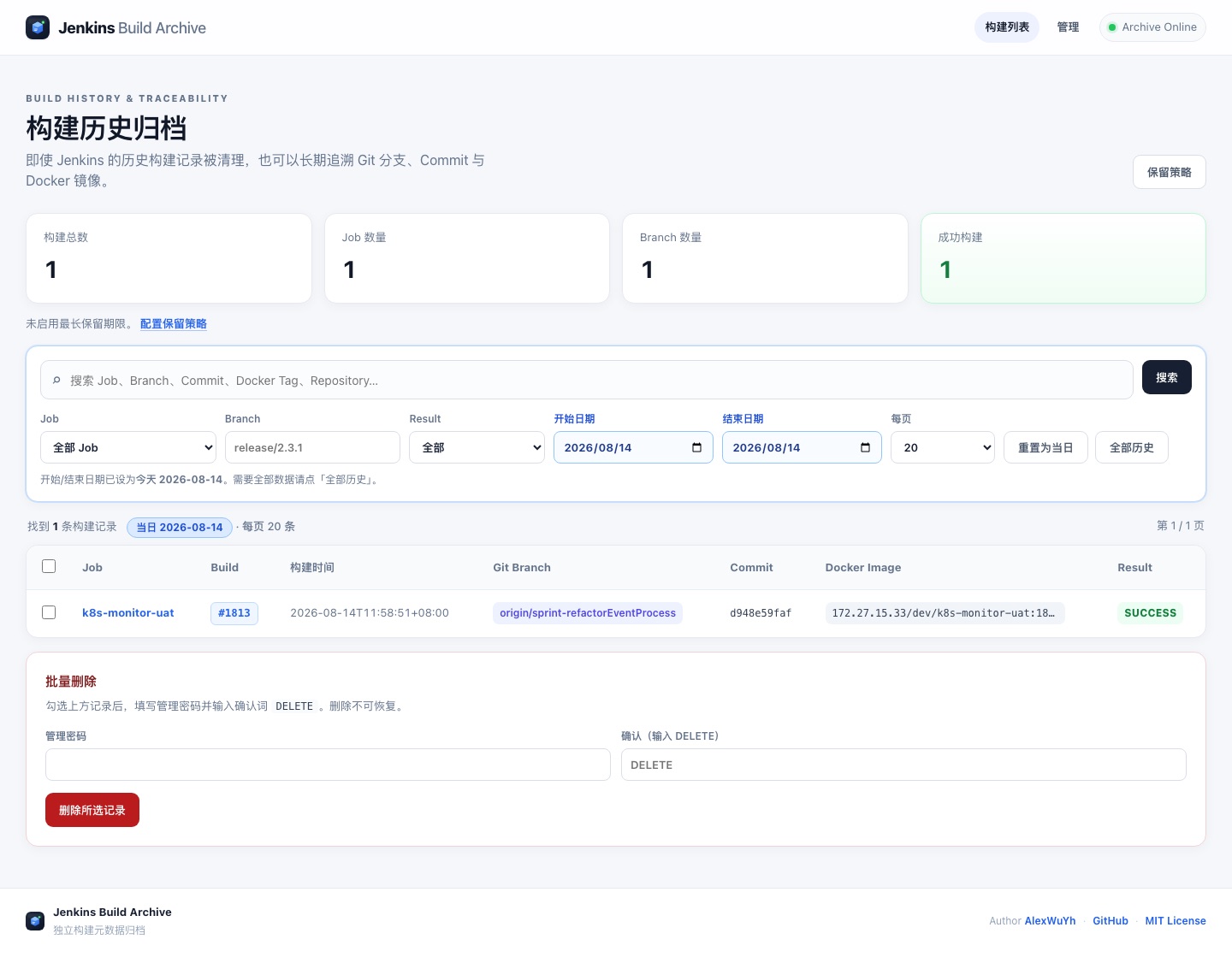
Build list (demo data): search by job, branch, commit or image tag; today only by default.
Jenkins cleans up old builds to save space, but when you debug a production issue you need to know which commit an image came from. This keeps that information in a small separate service.
| What | A build metadata archive independent of Jenkins; builds stay traceable after their records are cleaned up |
|---|---|
| Records | Job, build number, Git repository / branch / commit, commit author and changed files, Docker image tag and digest, build result and duration |
| Ingest | The pipeline posts at the end through the Shared Library's buildArchive() or a single curl; (jobName, buildId) is idempotent |
| Query | Built-in web UI and REST API, with search by job / branch / commit / tag and date filters |
| Stack | Python + FastAPI + SQLite, deployed with Docker Compose, MIT licensed |
After Jenkins removes a Build Record, the branch, commit and image information is still in the archive.
Branch, commit SHA, message, author and changed files are all recorded and shown on one detail page.
A tag can be overwritten, a digest cannot. Recording both is what makes long-term tracing reliable.
Filter by job, branch, commit, image tag, result and date. The list shows today by default, and "All history" is one click away.
Call buildArchive() in post { always { } }. If you would rather skip the Shared Library, a plain curl works too.
An error in the archive call only prints a warning and never turns the pipeline red; both successful and failed builds are stored.
Set a maximum age and a per-job record cap. Deleting needs the admin password and a typed confirmation word.
Write APIs use API_TOKEN and web admin uses ADMIN_PASSWORD; if either is not configured, those operations are refused.
One container and one SQLite file, started with Docker Compose. The schema initializes itself, and upgrading is just a rebuild.
Start it with Docker Compose on an internal server and set API_TOKEN and the admin password.
Set BUILD_ARCHIVE_URL and the token, and register this repo as a Shared Library named build-archive.
Call buildArchive() once in post { always { } }, and every build is stored automatically from then on.
The Shared Library is recommended; you can also skip it and curl straight from the Jenkinsfile.
First, under Manage Jenkins, set the global environment variables BUILD_ARCHIVE_URL and BUILD_ARCHIVE_TOKEN, and register this repo as a Global Pipeline Library named build-archive. Then:
@Library('build-archive') _

pipeline {
    agent any
    stages {
        stage('Build') {
            steps { sh 'echo build...' }
        }
    }
    post {
        always {
            buildArchive()   // must be always, so failed builds are stored too
        }
    }
}
The agent needs curl installed.
Before calling buildArchive(), put the image information in environment variables:
stage('Push image') {
    steps {
        script {
            def tag = "registry.example.com/dev/my-app:${env.BUILD_NUMBER}"
            env.DOCKER_IMAGE_TAG = tag
            sh "docker build -t ${tag} . && docker push ${tag}"
            env.DOCKER_IMAGE_DIGEST = sh(
                script: "docker inspect --format='{{index .RepoDigests 0}}' ${tag} | awk -F@ '{print \$2}'",
                returnStdout: true
            ).trim()
        }
    }
}
The service never queries the registry itself; the digest is passed in by the pipeline.
The ingest endpoint is POST /api/v1/builds, authenticated with a Bearer token; the same (jobName, buildId) updates the existing record. Try it by hand first:
curl -X POST http://127.0.0.1:8080/api/v1/builds \
  -H 'Content-Type: application/json' \
  -H 'Authorization: Bearer YOUR_TOKEN' \
  -d '{"jobName":"demo","buildId":1,"buildDate":"2026-08-14T10:00:00+08:00","buildResult":"SUCCESS","buildUrl":"https://jenkins.example/job/demo/1/"}'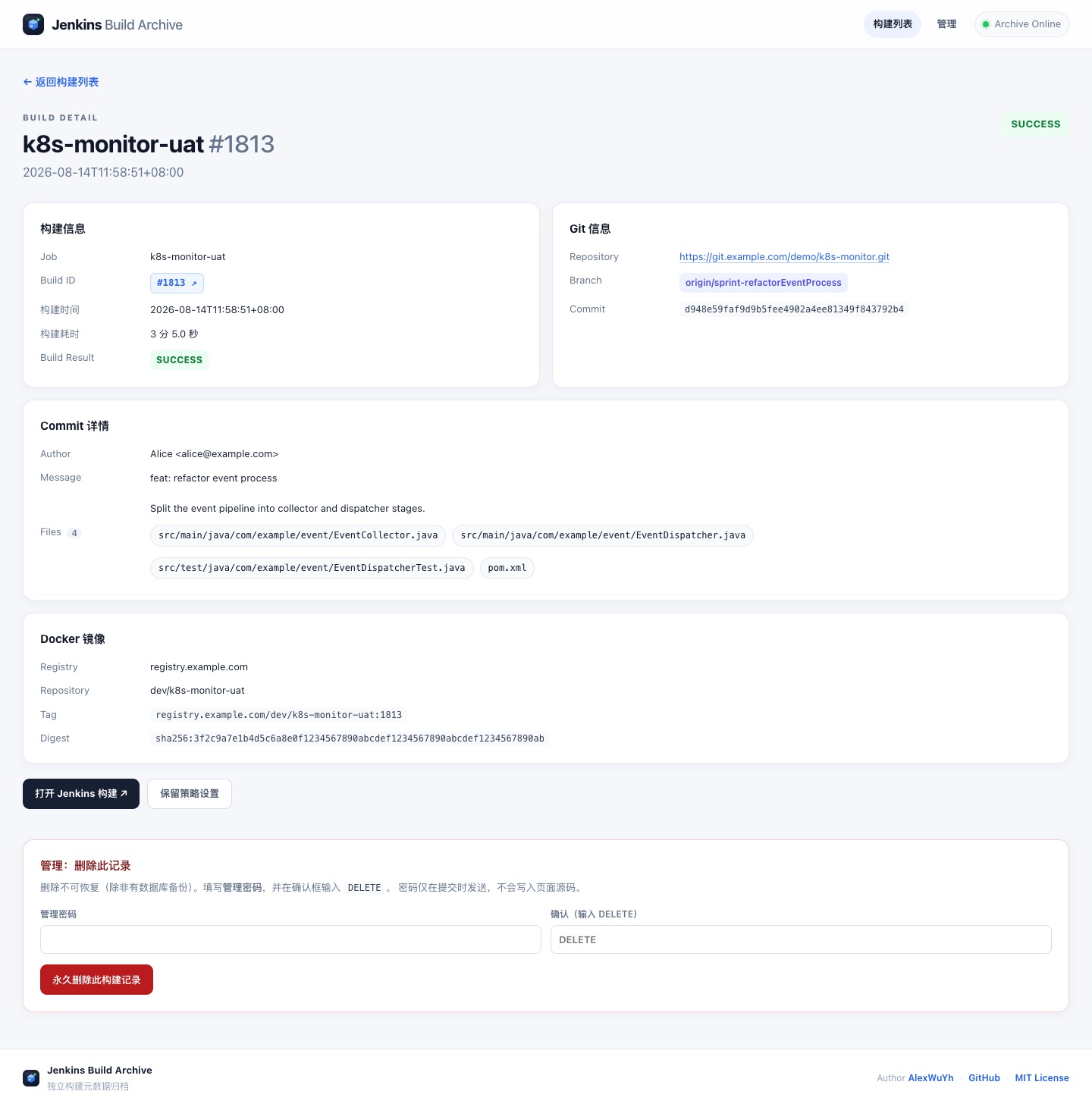
| Archive field | Jenkins source |
|---|---|
jobName | JOB_NAME |
buildId | BUILD_NUMBER |
gitBranch | GIT_BRANCH / BRANCH_NAME |
gitCommit | GIT_COMMIT |
commitMsg / commitAuthor / commitFiles | Same-named environment variables, or buildArchive(...) arguments |
dockerImageTag / dockerImageDigest | DOCKER_IMAGE_TAG / DOCKER_IMAGE_DIGEST |
buildResult | currentBuild.currentResult |
buildUrl / durationMs | BUILD_URL / currentBuild.duration |
Read endpoints are open by default; write and admin endpoints require a Bearer token.
| Method | Path | Auth | Description |
|---|---|---|---|
| GET | /health | None | Health check |
| GET | /api/v1/stats | None | Statistics |
| GET | /api/v1/builds | None | List, supports q / job / branch / result / dateFrom / dateTo / page / pageSize |
| GET | /api/v1/builds/{id} | None | Detail (including commit info) |
| POST | /api/v1/builds | Bearer | Create or update (idempotent) |
| DELETE | /api/v1/builds/{id} | Bearer | Delete |
| GET | /api/v1/admin/retention | Bearer | View the retention policy |
| POST | /api/v1/admin/retention/run | Bearer | Run the cleanup now |
Note: the API list applies no date filter by default; the web list shows only today, and /?all=1 shows the full history.
You need an internal server with Docker and Docker Compose. All data lives in a single SQLite file.
Clone the repo, enter the directory and copy the environment template.
git clone https://github.com/AlexWuYh/jenkins-build-archive.git
cd jenkins-build-archive
cp .env.example .env
Replace API_TOKEN and ADMIN_PASSWORD with your own values; do not keep the placeholders from the example.
API_TOKEN=replace-with-a-long-random-string
ADMIN_PASSWORD=set-an-admin-password
TZ=Asia/Shanghai
RETENTION_DAYS=365
RETENTION_MAX_PER_JOB=0
Once started, call the health endpoint, then open http://SERVER_IP:8080 in a browser.
docker compose up -d --build
curl http://127.0.0.1:8080/health
Data lives in ./data/build_archive.db. Use SQLite's backup API for online backups; to upgrade, pull the new code and rebuild, and the schema initializes itself.
docker exec jenkins-build-archive python -c \
  "import sqlite3; s=sqlite3.connect('/data/build_archive.db'); d=sqlite3.connect('/data/backup.db'); s.backup(d); d.close(); s.close()"

git pull
docker compose up -d --build| Variable | Meaning |
|---|---|
API_TOKEN | Bearer token for the write API; BUILD_ARCHIVE_TOKEN on the Jenkins side must match it |
ADMIN_PASSWORD | Password for web admin (delete, retention policy) |
TZ | Time zone; decides what "today" means in the list |
RETENTION_DAYS | Maximum retention in days, 0 turns it off; once saved in the UI, the value in the database wins |
RETENTION_MAX_PER_JOB | Maximum records kept per job, 0 turns it off |
Internal networks only: read endpoints need no login by default, so do not expose the service to the public internet, or restrict sources at the reverse proxy. Cleanup cannot be undone; back up the database before tightening the policy.
Full documentation (currently in Chinese): GitHub README, Shared Library docs.
Free, open source, and running inside your own network.